



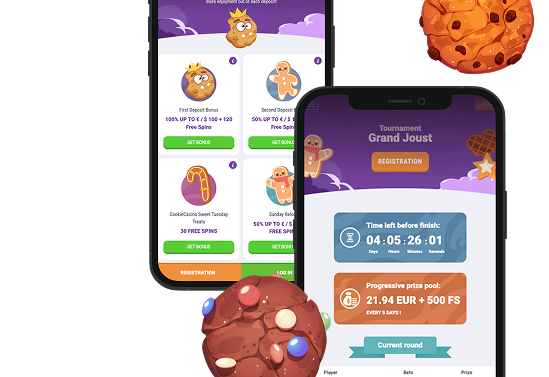
CookieCasino Canada App: Download on iOS & Android
Download the CookieCasino app for Canadian users on iOS and Android devices․ Learn how to install the app‚ system requirements‚ mobile website alternatives‚ and responsible gaming tools․
Join NowCookieCasino Canada App
For Canadian players who want their slots and blackjack on the go‚ CookieCasino app is a good option․ All the games you find on the desktop site can be accessed in a clean‚ thumb-friendly layout․ Whether you’re on the bus‚ in a coffee shop or at home‚ a couple taps get you in the action with a spin or a seat at the live dealer table․ There’s everything you need in menus‚ which are designed for one-handed use‚ quick payments and thorough security checks․
It provides information on how to use the app if you live in Canada‚ how to download and install the app on your iPhone or Android device (including the APK download)‚ and the best phones and operating systems․
Rather not download the app? You can add the mobile website to your home screen‚ where it works like a native app․ If anything does go wrong though‚ the quick fixes and FAQs at the end will soon have you back at the tables․


CookieCasino Canada App Overview
CookieCasino’s app delivers the entire desktop experience in a neat‚ tap-friendly package‚ letting Canadian players smoothly move from a quick slot to a live dealer table without the hassle of having to squint at the screen and hit tiny buttons․
What you get at a glance:
- Hundreds of mobile-friendly games: slots‚ classic table games (roulette‚ blackjack and baccarat)‚ and live dealer rooms designed for mobile․
- Fast‚ clear navigation: The Home‚ Games‚ Promos‚ and Account pages are accessible via a bottom tab bar․ A search bar and provider filter are persistent elements․
- Secure sign-in using Face ID or Touch ID on iOS and fingerprint unlock on Android․
- Push notifications include new tournament challenges‚ free spins‚ reload offers and seasonal events․ Users can opt out of receiving them at any time․
- In addition to instant deposits and withdrawals‚ a cashier flow tracks your saved payments and statuses․
- Responsible Play tools such as deposit limits‚ loss limits‚ cool-off periods and self-exclusion controls are accessible from the Account area․
- Live chat and email support that is available 24/7․ Mobile first help articles for instant answers․
Already signed up on desktop? Sign in using your details․ Canadian players can register in the CookieCasino app‚ verify their email‚ and immediately start playing Canadian online casino games․
How to Download & Install the App
Depending on your province and local laws the above may not be available․ If it’s not available in your store a solid no-download alternative can be found in the Mobile Web Version section․
iOS (iPhone & iPad)
Setting up on iOS takes about a minute. Here are the steps:
- Open the App Store.
- Search for “CookieCasino” or follow the official link on the brand’s website.
- Tap Get (or the cloud icon) to download.
- Once the install finishes, open the app and allow notifications if you want bonus alerts (optional).
- Log in with your existing account or create a new one. Turn on Face ID/Touch ID under Settings for faster sign-ins.
Tip: If the app is not available in the Canadian App Store, the mobile website with Add to Home Screen mirrors the native experience for most players. More on that below.
 Download the
 IOS app

Android (APK installation).
In some regions, including parts of Canada, casino apps are distributed via an APK file rather than Google Play.
- Open the official CookieCasino website on your Android device.
- Go to the App or Mobile page and tap Download APK.
- When prompted, allow installs from this source (Settings > Security > Install unknown apps) for your browser only.
- Open your Downloads folder, tap the APK file, and install.
- Launch the app, log in, and turn off “Unknown apps” again if you prefer to keep things tidy.
 Download the
 Android app


App Features & Benefits
This is a lightweight game‚ with relatively short load times‚ and you can resume your game quickly․ You can open the game‚ play a couple spins while you wait for another app to open‚ and if you have to walk away‚ your progress is saved․
It remembers your last game and filters‚ keeps important buttons within thumb reach‚ and reduces the number of taps you have to make to play comfortably on the go․ Game lobbies load smoothly even on a middling connection and the app recovers well with a dropped signal․
Mobile-First Optimisation
The interface is designed for a small screen with the controls located underneath your thumb․ The rest of the interface rearranges between portrait and landscape․ Less fiddling‚ more playing․
- Adaptive layouts scale across a range of different phone sizes and tablets․
- The game can be controlled one-handed with the spin‚ bet‚ and menu buttons․
- Filter by provider and use the game features to quickly find something new․
Security Baked In
Security is standard․ Every step‚ from login to withdrawal‚ is secured․ You have the only access to your account or sessions․ Here’s the short version:
- Biometric unlock (Face ID/Touch ID/fingerprint) as well as a 6-digit app PIN option․
- The traffic was encrypted using the same TLS standard as Canadian online banking․
- The session times out after inactivity and auto logs out after a period of inactivity․
Exclusive Mobile Touches
Just a couple of mobile-only perks keep me from being completely out of the loop:
- Push notifications for limited-time offers and tournament start times․
- In-app missions‚ with streak bonuses for consistently playing games (opt-in‚ always optional)․
- Quick cashier with saved methods and a real-time view of your itemized progress․

App Requirements & Compatible Devices
You don’t need a flagship phone to play it‚ though the livestreaming functionality and higher fidelity graphics are better on more powerful devices․ This was the case for players in Canada․
iOS (iPhone & iPad)
For best performance‚ please ensure your device meets the following minimum system requirements before downloading:
- Minimum OS: iOS 13.0
- Recommended: iOS 15 or later for best performance and battery life
- Compatible devices:
- iPhone 8 or newer (including SE 2020/2022, X, XR, 11/12/13/14/15 families)
- iPad (2018 or newer), iPad Air (3rd gen+), iPad mini (5th gen+), iPad Pro (all models with iPadOS 13+)
- Storage: ~200–300 MB free for app data and caching
- Connectivity: Stable 4G/5G or Wi-Fi. Live dealer streams prefer Wi-Fi or strong 5G
- Extras: Face ID/Touch ID supported where hardware allows

Android (Phones & Tablets).
Before you install on Android‚ check your device meets the minimum specifications for smooth graphics‚ quick lobbies and stable live tables:
- Minimum OS: Android 8․0 (Oreo)
- Recommended: Android 10 or later
- Hardware: 64-bit machine‚ 3 GB of RAM (4 GB recommended)
- CPU/GPU: Snapdragon 600 series or equivalent and above for smooth live play
- Storage: 300 MB available for the game and caches․ Game assets load as you play․
- Connectivity: Strong 4G/5G or Wi-Fi connection․ A stable Wi-Fi or strong 5G connection is required for live dealer games
- Permissions may include notifications (optional)‚ storage (caching)‚ or biometric unlock․
Performance tip: Minimize the number of other applications open on your device before opening a live dealer table‚ keep your operating system updated‚ and dim the screen or take a break if the device gets hot․



Mobile Web Version (No Download Required)
Prefer not to install anything? The CookieCasino mobile website gives Canadian players the full experience in a browser. Open Safari or Chrome on iOS or Android and you are straight in. The same game library, secure cashier, and account controls you use on desktop are all there.
Pages are light, touch targets are large, and games open in full-screen with a responsive layout, so switching between portrait and landscape feels natural. Your login, balances, limits, and bonuses sync across devices, and updates go live automatically with no action needed from you. Add it to your home screen (steps below) for a clean, app-like window.
How to make it feel like an app:
- iOS (Safari): Tap Share then Add to Home Screen. It opens in full-screen just like a native app.
- Android (Chrome): Tap the ⋮ menu then Add to Home Screen. You get an icon and a full-screen launch.
Why pick the web version?
- Zero storage impact – good for Canadian phones that are running low on space.
- Always current – no manual updates needed. Improvements go live automatically.
- Access anywhere – log in from any device, any time.

You can switch to the native app‚ should you want push notifications and login via Touch ID or Face ID․ Many players in Canada use both the native app for playing and the web app on another device for quick checks․
Join NowFrequently Asked Questions (FAQ)
-
1. I can’t find the app in my store. What now?
-
2. Is the APK safe?
-
3. Why does the Android install say “Blocked by Play Protect”?
-
4. Do I need a new account for the app?
-
5. Will the app drain my battery?

Responsible Gaming
Playing should be a fun experience‚ and CookieCasino gives Canadian players responsible gaming tools:
- Set deposit‚ loss‚ wager‚ and session time limits․
- If necessary‚ timeouts can last anywhere from 24 hours up to several weeks․
- Self-exclude for longer periods․
- You can check your play history to track your time and spending․
Please contact the Responsible Gambling Council (RGC) if gambling is no longer fun for you․ You live in Canada․ Ontario residents can also use the ConnexOntario service․ BeGambleAware‚ GamCare and Gambling Therapy are additional resources․ You must be 19 or older to play in most provinces or 18 in Alberta‚ Manitoba and Quebec․ Gamble responsibly‚ only make bets you can afford to lose and never chase losses․