



Cookie Casino App: Download on iOS & Android
Get the Cookie Casino app for iOS & Android. Step‑by‑step install, APK tips, features, device requirements, mobile web alternative, FAQs, and responsible play.
Join nowCookie Casino App
If you like your slots sweet and your blackjack crisp, the Cookie Casino app is the bite-sized way to keep your favourite games close at hand. Think of it as the same kitchen—just a smarter, tidier countertop. Fire it up on the bus, in a queue, or on the sofa, and you’re two taps from a spin or a seat at a live table. Menus are thumb-friendly, payments are streamlined, and security hums along in the background so you can focus on the fun part.
In this guide, you’ll get a clear walkthrough of how the app works, how to install it on iPhone and Android (including the APK route where it applies), and what kind of devices and OS versions give you the smoothest ride.
Prefer to skip downloads? We’ll show you how to add the mobile web version to your home screen so it behaves like a native app. And if anything goes sideways, we’ve included quick fixes and FAQs to get you back to the tables without fuss.


Cookie Casino App Overview
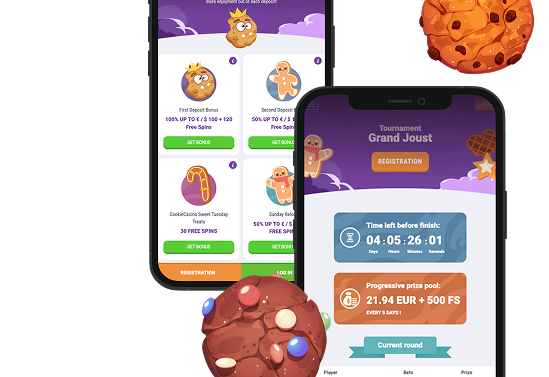
The Cookie Casino app brings the desktop experience into a clean, tap‑friendly package. It’s designed so you can jump from a quick spin to a live dealer table without squinting or fighting with tiny buttons.
What you get at a glance:
- Hundreds of mobile‑ready games: Slots, classic table games (roulette, blackjack, baccarat), and live dealer rooms optimised for smaller screens.
- Fast, intuitive navigation: A bottom tab bar for Home, Games, Promos, and Account, plus a persistent search and provider filter.
- Secure sign‑in: Optional Face ID/Touch ID on iOS and fingerprint unlock on Android.
- In‑app promos: Push notifications for new tournaments, free‑spin drops, reloads, and seasonal events—configurable so you can opt out anytime.
- Instant deposits & withdrawals: Streamlined cashier flow with saved methods and clear status tracking.
- Responsible Play tools: Deposit and loss limits, cool‑off, and self‑exclusion controls accessible from the Account area.
- 24/7 support: Live chat plus email, with mobile‑first help articles for quick fixes.
If you’re already registered on desktop, sign in with the same details. New to Cookie Casino? You can register directly in the app, verify your email, and you’re off to the races.
How to Download & Install the App
Availability can vary by country and local rules. If you don’t see the app in your store, jump to the Mobile Web Version section—there’s a great no‑download option.
iOS (iPhone & iPad)
Getting set up on iOS takes about a minute. Here’s the quick route:
- Open the App Store.
- Search for “Cookie Casino” or follow the official link provided on the brand’s website.
- Tap Get (or the cloud icon) to download.
- When the install completes, open the app and allow notifications if you want bonus alerts (optional).
- Log in with your existing account or create a new one. Enable Face ID/Touch ID under Settings for quicker sign‑ins.
Tip: If you can’t find the app in your App Store region, the mobile website (with Add to Home Screen) mirrors the native experience for most players. More on that below.
 Download the
 IOS app

Android (APK installation).
In some regions, casino apps are distributed via an APK (Android Package) rather than Google Play.
- Visit the official Cookie Casino website on your Android device.
- Find the App / Mobile page and tap Download APK.
- When prompted, allow installs from this source (Settings > Security > Install unknown apps) for your browser only.
- Open your Downloads, tap the APK file, and install.
- Launch the app, log in, and re‑disable “Unknown apps” if you like to keep things tidy.
 Download the
 Android app


App Features & Benefits
The app is light and responsive, with short animation cycles, near‑instant load times, and quick resume. Tap in, play a few spins while the kettle boils, and when life interrupts, the app parks your session so you can pick up right where you left off.
It remembers your last game and filters, keeps core controls under your thumb, and trims away extra taps so everything feels fluid on the move. Even on middling connections, lobbies load cleanly, and the app recovers gracefully if your signal blips.
Mobile‑First Optimisation
Here’s the idea in a nutshell: the interface is built for small screens first, so the important controls sit under your thumb and the layout reshapes itself as you move between portrait and landscape. In short, less fiddling, more playing.
- Adaptive layouts scale cleanly across small phones and big tablets.
- One‑hand controls put the spin, bet, and menu buttons within easy reach.
- Game filters by provider and features help you find something new in seconds.
Security Baked In
Security isn’t an add‑on here—it’s the default. From login to withdrawal, the app layers protection so your details stay private and sessions stay yours. Here’s the short version:
- Biometric unlock (Face ID/Touch ID/fingerprint) and 6‑digit app PIN option.
- Encrypted traffic with TLS—the same standard used by online banking.
- Session locks after periods of inactivity; auto‑logout on longer idle stretches.
Exclusive Mobile Touches
Little mobile‑only perks smooth out the experience and keep you in the loop without getting in the way:
- Push notifications for limited‑time offers and tournament start times.
- In‑app missions and “streak” bonuses that reward consistent play (opt‑in and always optional).
- Quick cashier with saved methods and clear step‑by‑step progress so you always know what’s happening.

App Requirements & Compatible Devices
You don’t need a flagship phone to enjoy the app, but smoother graphics and live streams appreciate a bit of horsepower. Here’s what we recommend for a silky experience.
iOS (iPhone & iPad)
Before you hit download, make sure your device ticks these boxes—this keeps the app fast and stable on iPhone and iPad:
- Minimum OS: iOS 13.0
- Recommended: iOS 15 or later for best performance and battery efficiency
- Compatible devices:
- iPhone 8 or newer (including SE 2020/2022, X, XR, 11/12/13/14/15 families)
- iPad (2018 or newer), iPad Air (3rd gen+), iPad mini (5th gen+), iPad Pro (all models with iPadOS 13+)
- Storage: ~200–300 MB free for app data and caching
- Connectivity: Stable 4G/5G or Wi‑Fi; live dealer streams prefer Wi‑Fi or strong 5G
- Extras: Face ID/Touch ID supported where hardware allows

Android (Phones & Tablets).
Before you install on Android, do a quick device check—these baseline specs keep graphics smooth, lobbies snappy, and live tables stable:
- Minimum OS: Android 8.0 (Oreo)
- Recommended: Android 10 or later
- Hardware: 64‑bit device, 3 GB RAM minimum (4 GB+ recommended)
- CPU/GPU: Snapdragon 600‑series or equivalent and up for smooth live play
- Storage: 300 MB free for the app + caches; games load assets on the fly
- Connectivity: Stable 4G/5G or Wi‑Fi; for live dealer, Wi‑Fi or strong 5G recommended
- Permissions you might see: Notifications (optional), storage (for caching), biometric unlock
Performance tip: Close background apps before launching a live dealer table, and keep your OS updated. If your device heats up during long sessions, reduce brightness or take a short break—your battery will thank you.



Mobile Web Version (No Download Required)
Prefer to travel light? The mobile website delivers the full Cookie Casino experience without installing anything—open your browser and you’re in. It’s optimised for Safari and Chrome on iOS and Android, mirroring the same game library, secure cashier, and account controls you use on desktop.
Pages are lightweight, touch targets are generous, and games open in full‑screen with responsive UI, so switching between portrait and landscape feels natural. Your login, balances, limits, and bonuses sync across devices, and updates roll out automatically in the background. For an app‑like feel, add it to your home screen (steps below) to launch Cookie Casino in a clean, distraction‑free window.
How to make it feel like an app:
- iOS (Safari): Tap Share → Add to Home Screen. Now it opens in a full‑screen window, just like a native app.
- Android (Chrome): Tap the ⋮ menu → Add to Home screen. You’ll get an icon and a full‑screen launch.
Why choose the web version?
- Zero storage impact—perfect for 64 GB phones that are… not actually 64 GB anymore.
- Always up to date—no manual updates; improvements roll out automatically.
- Instant access across multiple devices—log in anywhere, anytime.

If you later decide you want push notifications or biometrics, you can switch to the native app in a few taps. Many players happily use both: the app for regular play, the web for quick check‑ins on a different device.
Join nowFrequently Asked Questions (FAQ)
-
1. I can’t find the app in my store. What now?
-
2. Is the APK safe?
-
3. Why does the Android install say “Blocked by Play Protect”?
-
4. Do I need a new account for the app?
-
5. Will the app drain my battery?

Responsible Gaming
Playing should feel fun, light, and under control—like a treat, not a habit. Cookie Casino includes tools to help you stay on track:
- Set limits on deposits, losses, wagers, and session time.
- Take timeouts (24 hours to several weeks) if you need a reset.
- Self‑exclude for longer breaks.
- View your history to keep perspective on time and spending.
If gambling stops being fun, help is available. Consider resources such as BeGambleAware, GamCare, Gambling Therapy, and Gamblers Anonymous in your region. You must be 18+ (or the legal age in your jurisdiction) to play. Never gamble with money you can’t afford to lose, and never chase losses.